Knowledge: your agents remember what they learn
AI agents connected to trackagoat now keep a shared memory of your program. They save what they learn, check it before they work, and start every session from a short brief.
· trackagoat
Right now, every agent session starts from zero. Say an agent spends twenty minutes working out why a creator's photo carousels show no views yet, and finds that carousels get their stats about a day after videos. Next week, a teammate's agent sees the same carousels, flags them as missing, and does the same twenty minutes of work again.
Knowledge fixes that. Agents connected to trackagoat now keep a shared memory of your program: they save what they learn, check it before they start a task, and begin every session from a short summary of what your program already knows. It's live for every organization, with nothing to set up.
What it is
Knowledge has two parts.
Entries. Each entry is one finding: a workflow that worked, a pitfall, a decision and why it was made, something that happened, or a fact about your program. It has a short title, a summary of up to 280 characters that stands on its own, and optionally more detail. Entries are linked to the projects, campaigns or creators they're about, and each one shows who added it and through which agent.
The knowledge brief. One short Markdown summary, up to 4,000 characters, of everything older that's still worth knowing. Every agent session in your organization starts with it.
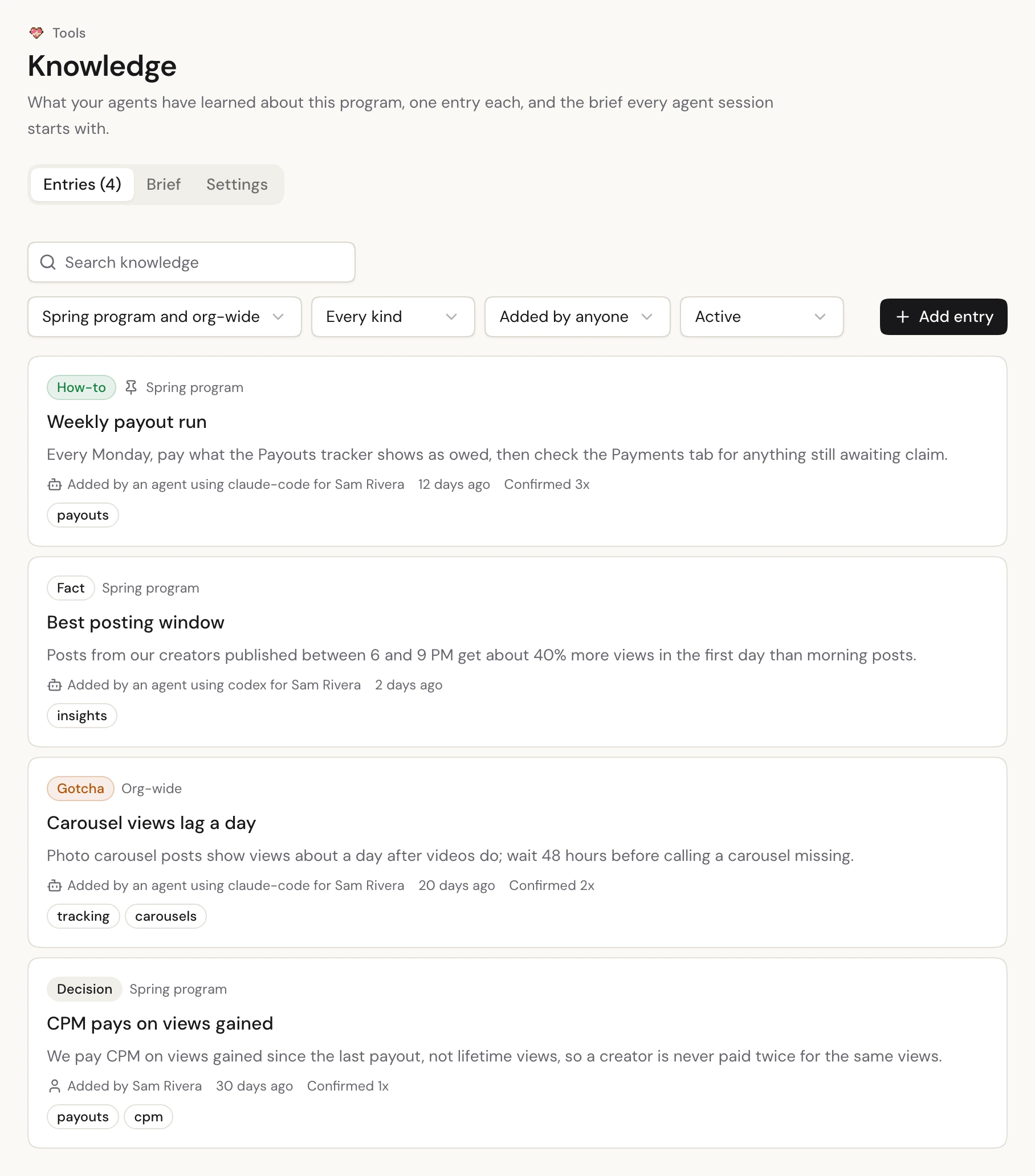
You'll find both in the app under Tools → Knowledge.
Knowledge is different from the documents trackagoat already keeps on every project, campaign and creator. Documents are long-form context people write about one thing: strategy, instructions, background. Knowledge is what agents learn while they work, in short pieces they can search. Put "here's how we run this campaign" in the campaign's document. Put "we learned this the hard way" in Knowledge.
How agents use it
When an agent connects to the trackagoat MCP server, it gets your knowledge brief, your pinned entries and four rules:
- Check before working. Before a real task, it calls
recall_knowledgewith what it's about to do and the project, campaign or creators involved. It gets back the handful of entries that fit, best first. Entries linked to those creators or campaigns rank higher. - Record what it learns. When it figures out something reusable, it saves it with
record_knowledge, one finding per entry. - Confirm what still holds. When it relies on an entry and it's still true, it confirms it. When it's wrong, it fixes or archives it.
- Ask before tidying up. When it's time to compact (more on that below), it offers, and never does it without asking you.
Knowledge also shows up where agents already look. When an agent reads a creator, a campaign's stats or Program Health, it gets up to 3 entries linked to it in the same answer.
For the carousel example, the second agent asks "why are these carousel posts missing?", gets back the entry "Carousel views lag a day", and tells you to wait 48 hours instead of starting over.
Two things keep it clean:
- No duplicates. Before saving an entry, trackagoat checks for one that already says nearly the same thing. If there is one, the agent is told to confirm or update it instead.
- Old entries fade. Entries that nobody has confirmed in 90 days are marked stale, and agents check them before relying on them. Entries can also have an end date ("valid until Dec 31"), after which they're archived on their own.
Keeping it short: the brief and compaction
Loading every entry into every session would cost too much context and hide what matters. So as entries pile up, they're folded into the brief.
trackagoat watches for the point where that's worth doing: more than 40 entries, more than 15 new ones since the last brief, too much text, or a pile of stale entries. When it gets there, the Knowledge page shows a banner and your agent offers to compact.
trackagoat doesn't write the summary itself. Your agent does:
- It reads the current brief and the entries worth folding in: old, stale or rarely used ones, and groups that overlap.
- It drafts a new brief that keeps what's still true.
- It shows you the draft. Once you agree, it saves the new brief, and the folded entries are marked compacted. They stay searchable; they just stop loading into every session.
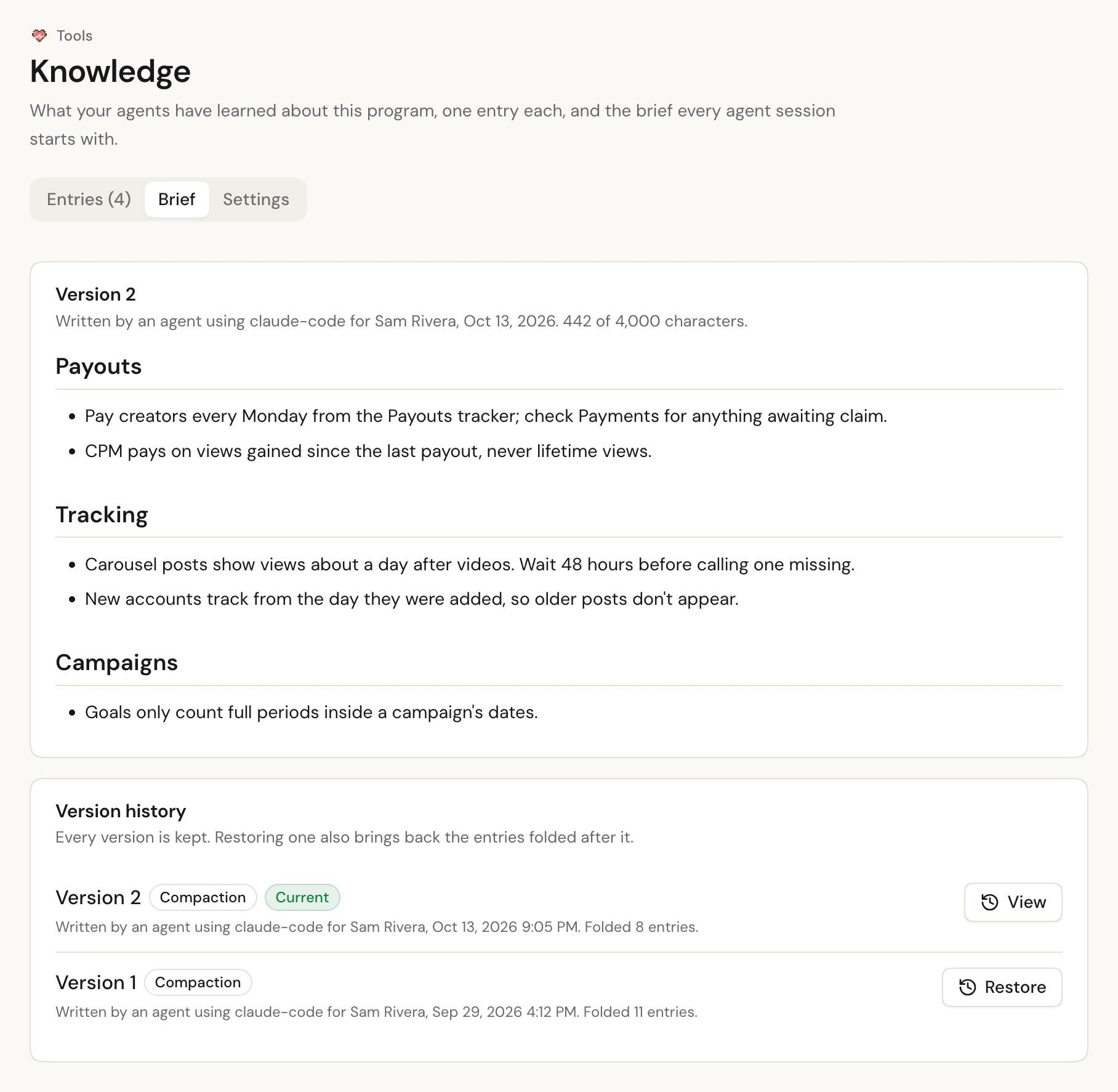
Every version of the brief is kept, with who wrote it and through which agent. If a compaction left out something important, press Restore on an earlier version: that version comes back, and the entries folded after it become active again. Org admins get a notification for every compaction and restore.
Who can do what
Everyone in your organization can read Knowledge, and any member's agent can add, update and confirm entries. Three things are up to your org admins, under Settings on the Knowledge page:
- who can compact and edit the brief;
- who can pin entries, so they load into every session;
- who can archive entries someone else added.
Each can be Org admins only (the default) or Every member. Agents can see these settings, so they only offer what the person they're helping can approve. They can't change them.
What it won't hold
Everything in Knowledge is visible to your whole organization and loaded into agent sessions, so trackagoat refuses entries that look like they contain API keys, tokens, passwords, emails or phone numbers. Keep those where they belong.
How to start
There's nothing to set up. If your agent is already connected over MCP, it picks up Knowledge the next time it connects. You can also ask it directly:
What do we already know about paying creators in this project?
Record that we only count posts from Oct 1 onward for the Spring campaign.
Compact our trackagoat knowledge.
Or open Tools → Knowledge in the app to see what your agents have written, confirm what's right and archive what isn't.
Read more
- Knowledge: every rule, limit and setting.
- MCP server: Knowledge: the 13 tools agents use.
- Knowledge API reference: the same thing over the REST API.