Pay creators from trackagoat with Dots
Connect your Dots account and pay what creators earned in one step, from the app or from your AI agent. trackagoat records every payment as it sends it.
· trackagoat

Until now, paying creators took two steps. You worked out what each creator was owed in trackagoat, paid them in your payout tool, then came back and clicked Mark as paid so the tracker stayed correct.
Now you can connect your Dots account and do it in one step. trackagoat sends the payout through Dots and records the payment at the same time, so the Payouts tracker, each creator's Payouts tab and your exports update on their own. Your AI agent can do it too, inside limits you set.
How it works
Say a creator earned $15 a week on a weekly CPM structure and you haven't paid them for 3 weeks. Their row in the Payouts tracker shows $45 owed. Click Pay, and the payment sheet opens with all 3 weeks checked and Send with Dots selected. Click Review payout, check the summary, then click Send.
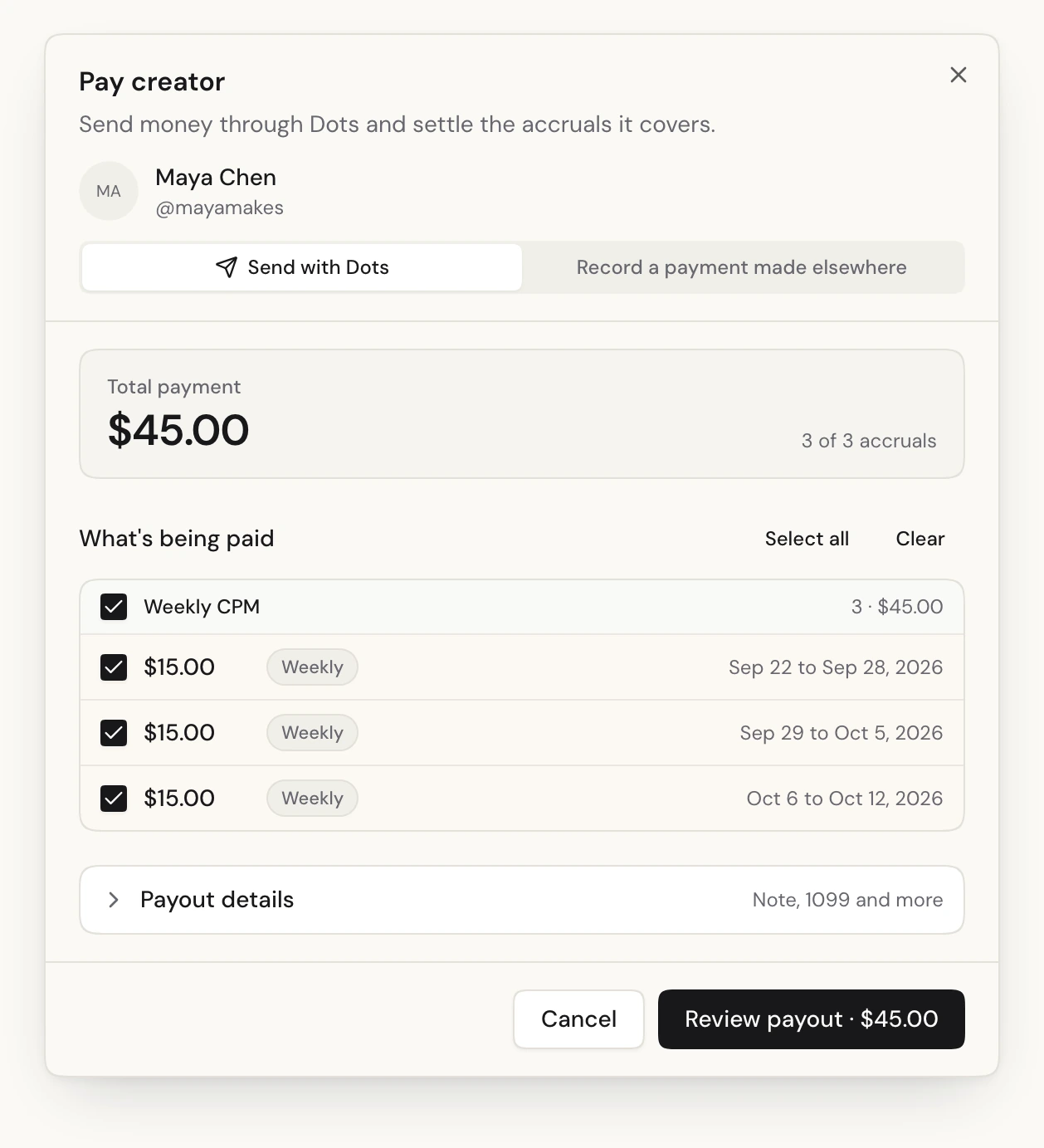
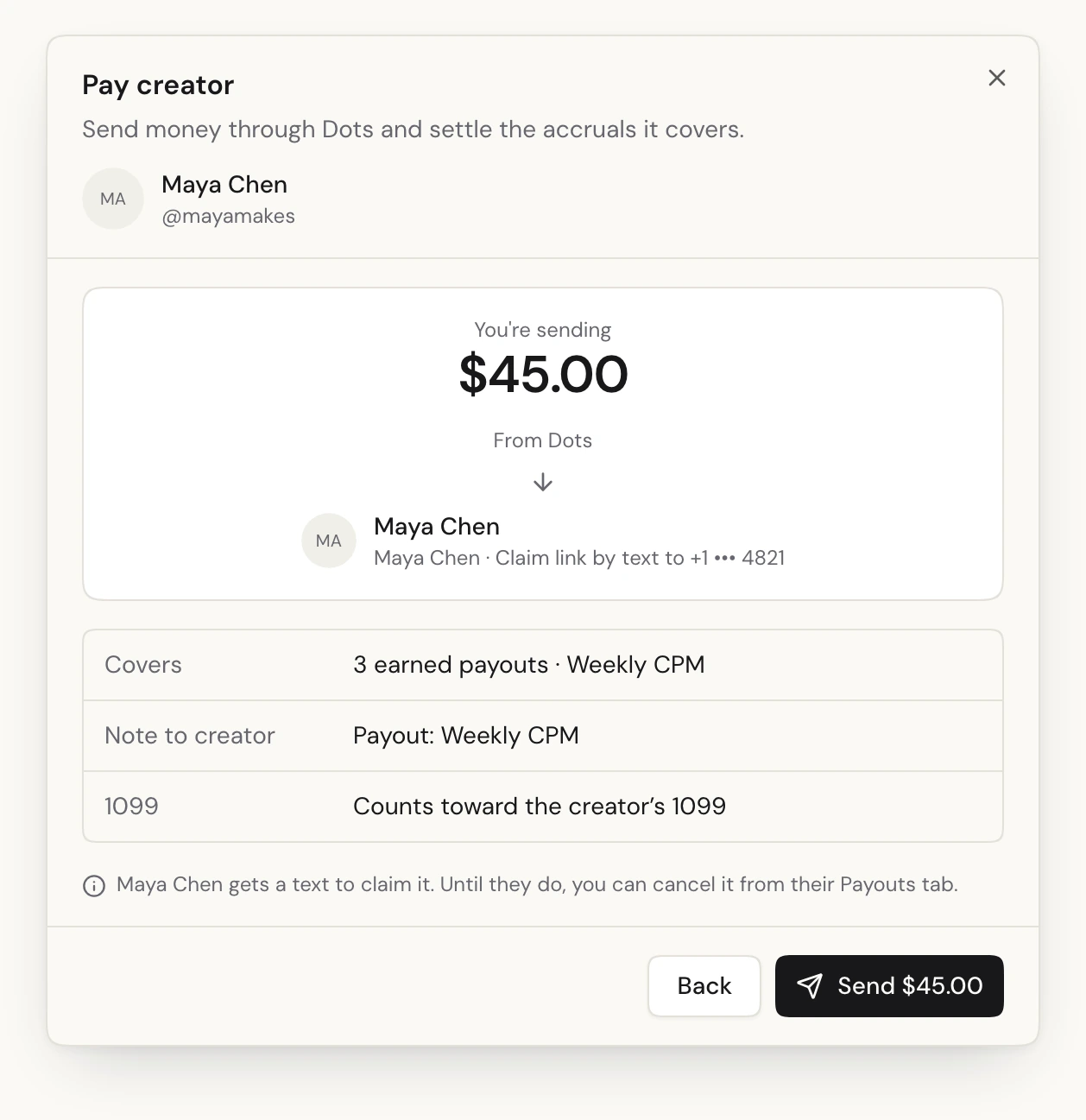
The payment is recorded the moment you send, and those 3 weeks are marked paid. Dots moves the money from your Dots balance to the creator. If they already have a Dots account, it lands in the payout method they chose there. If you linked them by phone number, Dots texts them a link to claim it, and trackagoat remembers their Dots account once they do.
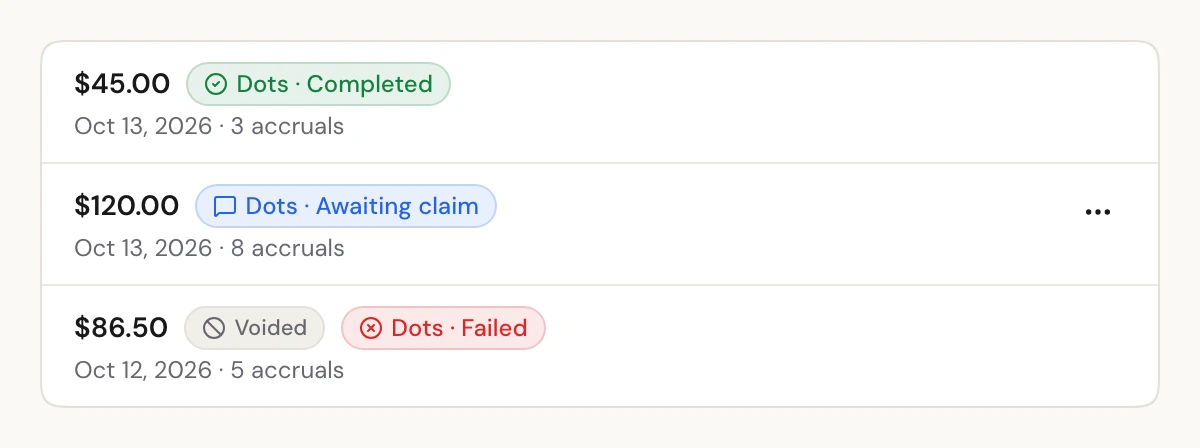
Each payment shows where it's at on the creator's Payouts tab: Completed, Awaiting claim or Processing. If Dots can't pay it (for example, your balance is too low) or the creator never claims it, the payment is voided on its own, those weeks show as owed again, and every org admin gets a notification.
Paying by Venmo, PayPal or bank transfer outside trackagoat still works the same way, with Mark as paid.
It never pays twice
Paying the wrong amount is bad. Paying twice is worse. So the payment is recorded and the payouts are marked paid before trackagoat asks Dots to send anything. If two people press Pay at the same time, only one payment goes through.
Every send carries an idempotency key, so pressing Send twice or retrying after a dropped connection gets you the same payment, not a second one. And if Dots doesn't answer in time, trackagoat doesn't guess. It marks the payment Unconfirmed and checks with Dots again every 5 minutes, with the same key, until it knows what happened.
Set it up
You need to be an org admin, and you need a Dots app with a balance to pay from.
- Connect Dots. Go to Org settings → Payment providers, click Connect next to Dots and paste your Dots client ID and API key. trackagoat checks them with Dots before saving them, stores them encrypted and only ever shows the last four characters. Want to try it first? Connect your Dots sandbox keys and pay with test money.
- Link creators to their Dots payees. On the same page, the Creators and payees table lists every creator and what you owe them. Find matches in Dots suggests a match for each person your Dots account knows. Nothing is linked until you accept it. For anyone else, click Link and pick them from Dots or enter their mobile number.
- Optional: instant updates. Add trackagoat's webhook URL in Dots and statuses update the moment something changes. Without it, they update within about 5 minutes.
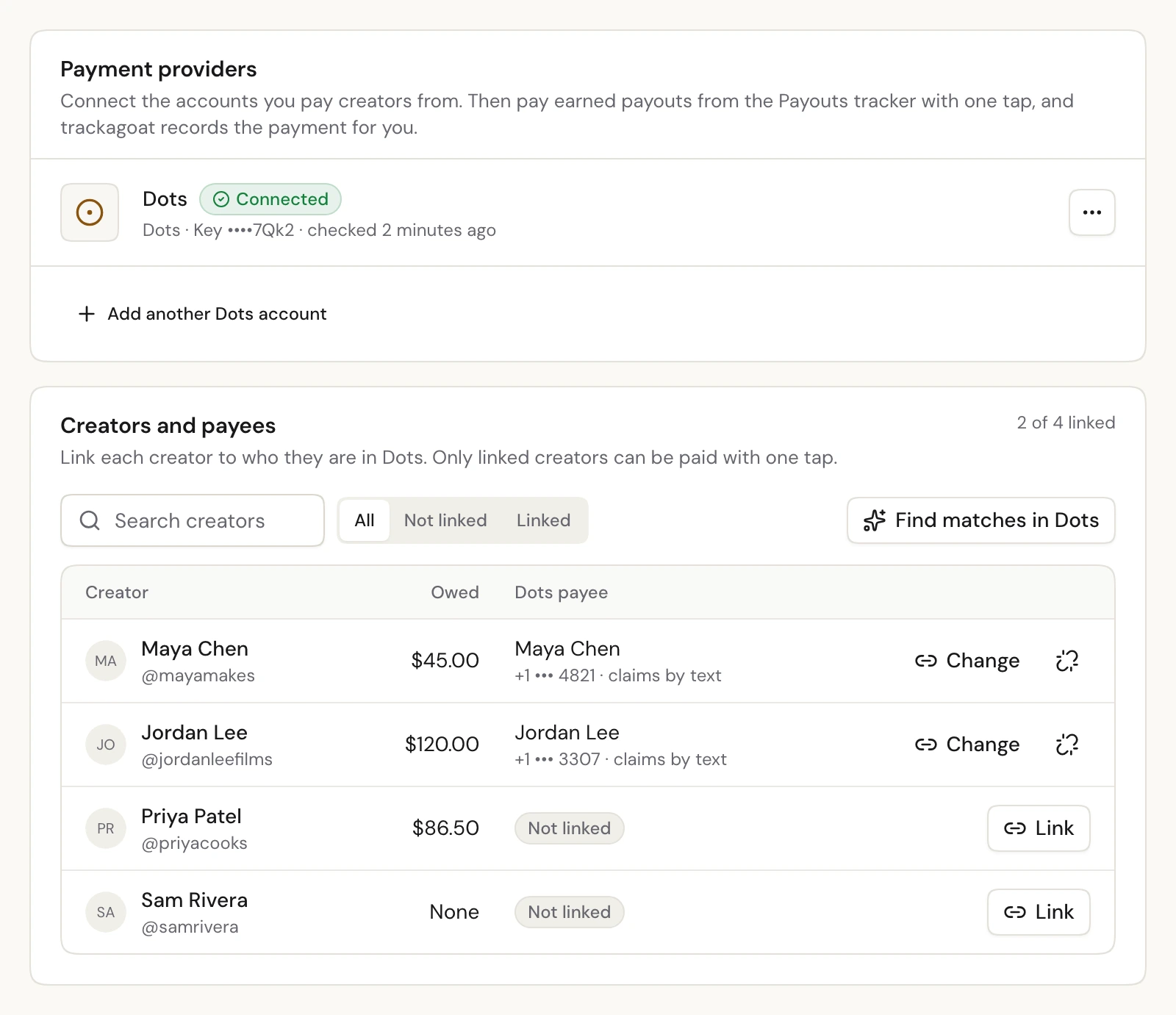
trackagoat checks every payee with Dots before linking it. A payee who's already linked to another creator is refused, so one creator's money can't go to someone else by mistake.
If you pay from more than one Dots account (for example, one per brand), connect both. A creator can have a payee on each, and one of them is preferred: that's who you pay unless you choose another.
Let your agent pay creators
trackagoat is built so an AI agent can run your program the same way you do, and that includes payouts. With the MCP server connected, you can ask Claude, Codex or Cursor something like:
Pay everyone what they're owed for September, but check the total with me first.
The agent reads the Payouts tracker, tells you who it's about to pay and how much, and after you confirm, sends each payout with the send_payout tool. It can also look up payees (search_payees), check who a creator is paid as (get_payout_account) and link a creator to a payee (link_payee). Every tool calls the same endpoint as the REST API, with the same rules.
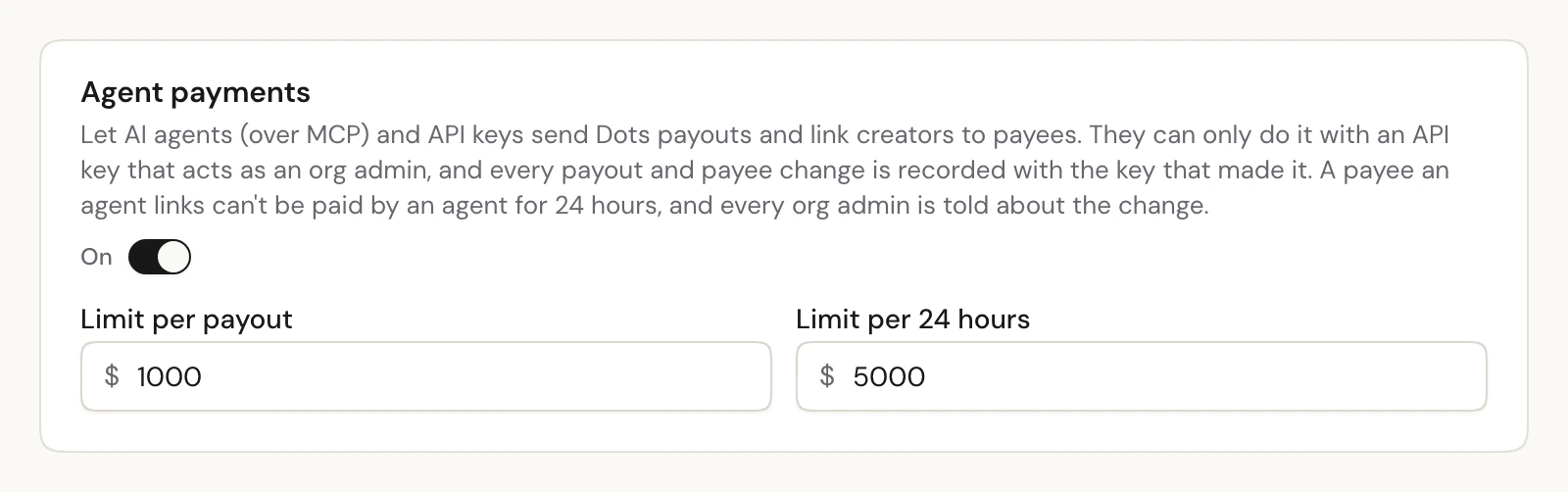
Sending money is off until an org admin turns on Agent payments in Org settings → Payment providers. No API key can turn it on. When it's on:
- There are limits. A limit per payout and a limit per 24 hours, starting at $1,000 and $5,000. A payout over a limit is refused and nothing is sent.
- Only admins. Only a connection or API key that acts as an org admin can send payouts or change payees.
- New payees wait 24 hours. Choosing a creator's payee decides where their money goes. So when an agent links or changes a payee, agents can't pay that payee for 24 hours. You can still pay them yourself in the app, and you can press Approve to end the wait once you've checked it. An agent can approve a payee too, but never one set by the same key or the same admin.
- Everyone's told. Every payee change an agent makes notifies every org admin, names the API key that made it and shows up in the creator's change log.
- Agents see less. Phone numbers show only their last 4 digits, and emails are masked.

Every payment records whether it was sent from the app, the API or an agent, and which key sent it.
What it costs
trackagoat doesn't charge for sending payouts, and it never holds your money. Money moves from your Dots balance to the creator through Dots, and Dots charges its usual fees. Any Dots plan can send payouts.
Read more
- Paying creators with Dots: every step, every status and the full agent rules.
- Payouts: payout structures, the tracker and recording payments by hand.
- MCP server: connecting your agent and every tool it can use.
Dots is the first payment provider trackagoat connects to. If you pay creators with something else, tell us which at support@trackagoat.com.